


Vinylora Cassette Box (NFC)
Vinylora Cassette Box (NFC)
🎵 Add Your Favorite Songs
🧲 Magnetic Fridge Design
💿 9 Magnetic Casette Included
🎁 Perfect Gift Idea

Click the circle to add the USB adapter to your cart.

3-in-1 USB Adapter for Mobile Devices
Couldn't load pickup availability
What’s included
What’s included
• 1 Vinylora NFC Music Box
• 9 Magnetic Music Discs
• Includes 1 USB Type-C charging cable
How Does It Work?
How Does It Work?
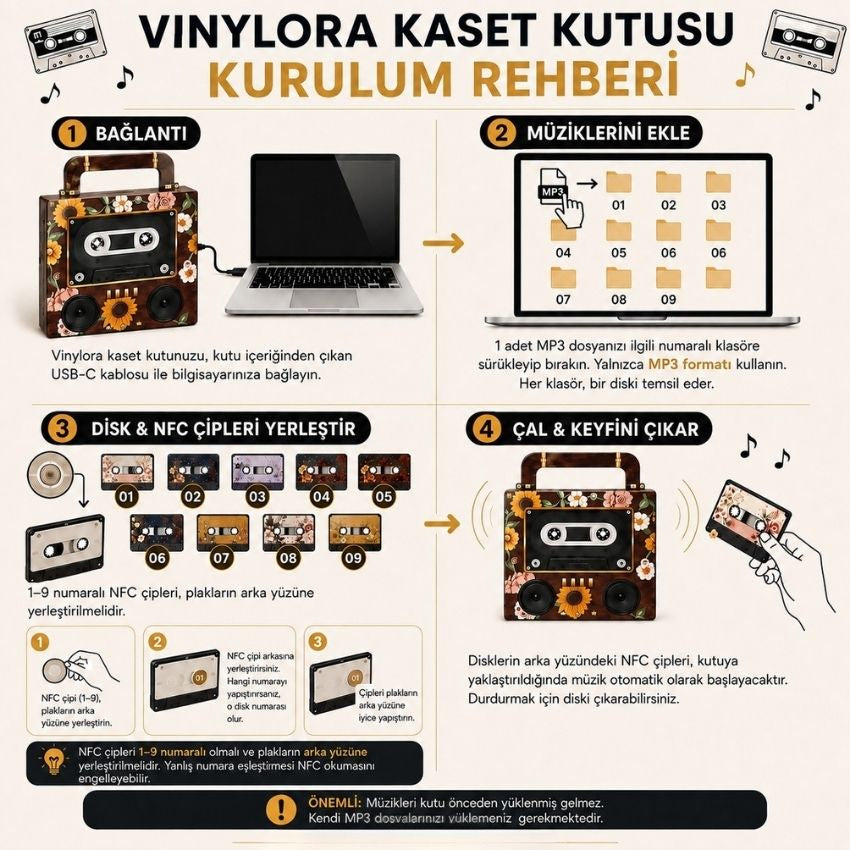
Vinylora NFC Music Box – User Guide
1. Getting Started
Before using your Vinylora Music Box for the first time, make sure the device is fully charged.
- The USB-C port on the side is used for both charging and transferring music.
- To power on the music box, press and hold the black button on the back until you hear a short melody.
- The melody confirms that the device is powered on.
- To turn the device off, press and hold the same button again.
2. Uploading Your Songs
Step 1 — Connect to Your Computer
Use the included USB data cable to connect the music box to your computer.
Step 2 — Open the Drive
A removable drive named “NO NAME” will appear on your computer.
Inside, you will find folders numbered 1 through 9.
Step 3 — Delete the Test Audio Files
Delete the factory test audio files (for example, A001) before adding your own music.
Step 4 — Import Your MP3 Files
Make sure your songs are in MP3 format.
Drag and drop each MP3 file into the desired folder (1–9).
Each folder represents one song.
3. Preparing the NFC Chips
After importing your songs, test the NFC chips before attaching them.
- Hold one of the NFC chips close to the music box.
- Make sure the correct song plays.
- Remove the protective backing from the NFC chip.
- Stick the NFC chip to the back of any music disc.
- Repeat the same process for the remaining discs.
4. Using the Music Discs
- Remove the protective film from the front of each disc.
- Place the prepared disc onto the music box.
- Your selected song will begin playing automatically.
You can personalize your music discs using the included FREE 60+ Artist Sticker Pack.
Important Notes
- Only MP3 audio files are supported.
- Always use the included USB data cable when transferring music.
- Make sure the device is powered on before placing a disc.
- If a disc does not play, remove it and place it back correctly.
- You can change your songs at any time by replacing the MP3 files in the numbered folders.
How to Upload Music ?
How to Upload Music ?
How do I upload music to the Vinylora Music Box?
Uploading your music is quick and easy.
- Turn on the music box.
- Connect it to your computer using the included USB data cable.
- Open the “NO NAME” drive that appears.
- Delete the factory test audio files (such as A001).
- Drag and drop your MP3 files into the numbered folders (1–9).
- Safely eject the device.
- Test the NFC chips, attach them to the back of your discs, and enjoy your music.
Note: Only MP3 audio files are supported.
Return Process
Return Process
You may request a return within 14 days of receiving your order. To be eligible for a return, the item must be unused and in its original packaging.
How can I track my order?
How can I track my order?
You can track your shipment through our tracking page by entering your order Track your Order




💿 Create Your Own Vibe
Personalize your music discs, express your style, and enjoy your favorite songs in a unique way.

Why People Love Vinylora
✓ Add Your Favorite Songs
✓ Instant NFC Playback
✓ 9 Vinyl Casette Included
✓ One Song Per Disc
✓ USB-C Rechargeable
✓ A Unique Gift They'll Never Forget

NFC Disc Setup Guide
Match each numbered NFC sticker with its corresponding folder to create your personalized music collection.